



Download Neon NZ – Streaming App, TV Shows, Movies, Lightbox NZ
Overview
Neon NZ, formerly known as Lightbox NZ, is a desktop streaming application designed for users in New Zealand seeking access to a curated library of television series and blockbuster films. The software enables viewers to stream new and exclusive content, including binge-worthy series and cinema releases, directly from their PC. It serves as a digital entertainment hub for individuals and families who prefer on-demand viewing without advertisements.
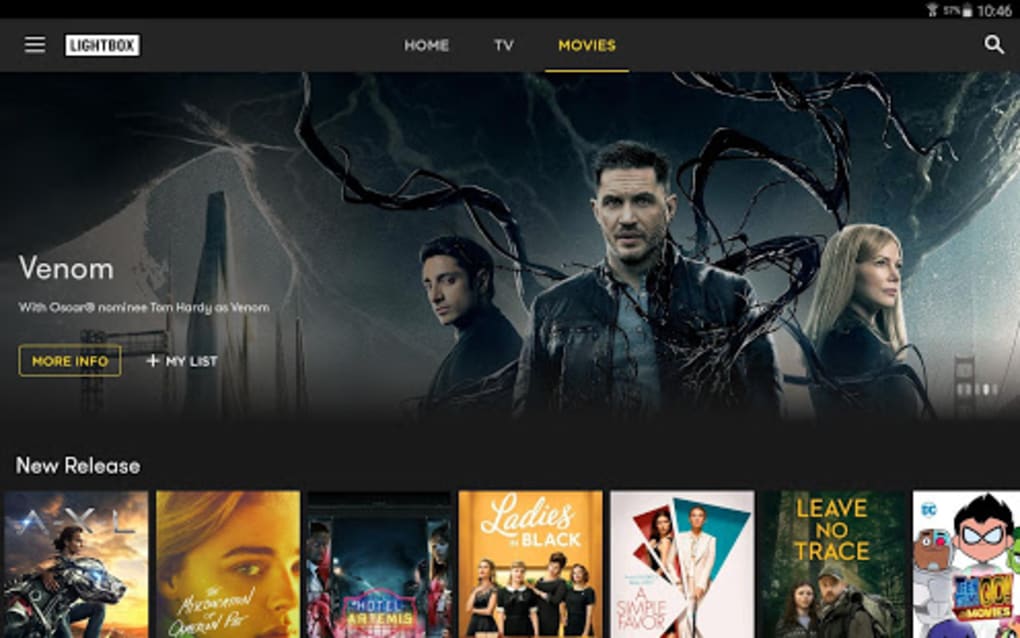
The platform supports multiple user profiles, allowing personalized experiences across households. Users can browse content through categorized thumbnails, track recently added titles, and save favorites using the “My List” feature. The application is intended for consumers looking for a Netflix-like experience with locally relevant programming.
It is available through a subscription model, offering both standard and premium tiers. The software supports cross-device streaming, including compatibility with Chromecast for larger screen viewing. However, performance and reliability issues have been reported, particularly after recent updates.
The developer did not provide additional system requirements beyond the platform, and exact technical specifications were not specified.
Key Features & Capabilities
- Extensive Content Library – Offers a broad selection of TV shows and movies, including exclusive series not available on other platforms.
- User Profiles – Allows multiple users to create individual profiles, each with personalized recommendations and viewing history.
- My List Feature – Enables users to save favorite shows and movies for quick access without repeated searches.
- Multi-Device Streaming – Supports playback across compatible devices, including smart TVs and mobile phones, with seamless transitions.
- Chromecast Integration – Facilitates casting content to larger screens for enhanced viewing experiences.
- Ad-Free Viewing – Provides uninterrupted streaming without commercial interruptions.
- Content Recommendations – Displays trending and recently added titles on the homepage to guide user discovery.
These features aim to streamline the entertainment experience by reducing search time and enhancing personalization. The ability to maintain a curated list supports long-term engagement, while cross-device functionality ensures flexibility. Chromecast compatibility is particularly useful for users who prefer watching on larger screens.
However, the effectiveness of these features is limited by reported technical instability, which impacts overall usability. The developer did not specify how content is updated or how frequently new titles are added. Performance observations are based on general software behavior patterns.
User Interface, Workflow & Performance
The user interface of Neon NZ follows a modern, grid-based layout similar to major streaming platforms, with large thumbnails and categorized sections for easy navigation. Users can browse content by genre, popularity, or release date, with intuitive access to personal lists and recently watched items. The workflow is designed to minimize friction, allowing users to start streaming with minimal steps.
However, performance issues have been consistently reported, particularly after recent updates. Users experience frequent crashes during playback, and the application often fails to launch properly, even with stable internet connections. When connectivity drops, the app closes unexpectedly, requiring a restart.
The developer did not specify resource usage details, so CPU and RAM behavior remain unknown. Stability appears to be a significant concern, with no clear indication of how the software handles background processes or memory management. The lack of detailed performance data makes it difficult to assess efficiency under various conditions.
Users have also reported that the app freezes during download attempts, suggesting potential issues with data handling or caching mechanisms.
Workflow Efficiency
While the interface supports efficient navigation, the underlying instability undermines workflow effectiveness. Repeated crashes and launch failures disrupt the viewing experience, negating the benefits of a streamlined design. The My List and recommendation features are only useful if the app remains functional. Without consistent access, these tools lose their value. The overall workflow is hindered by technical shortcomings that prevent users from fully leveraging the platform’s intended functionality.
Compatibility & System Requirements
Neon NZ is available for Windows and Mac operating systems, with a desktop application version designed for PC use. The software requires a monthly subscription to access its full content library. The installation size was not specified, and exact system requirements were not listed.
Compatibility information is limited to the supported platforms, with no mention of hardware specifications such as minimum RAM, processor, or storage. The developer did not provide details on whether the app supports older OS versions or specific graphics cards. Users are advised to ensure their device meets general streaming application standards.
The software is intended for use on devices capable of handling high-definition video playback. The developer did not specify whether offline viewing is supported beyond the initial download process. Performance observations are based on general software behavior patterns.
Pros and Cons
Pros
- Large library of TV shows and movies, including exclusive content
- Supports multiple user profiles for personalized experiences
- Ad-free streaming experience
- Chromecast compatibility for larger screen viewing
- My List feature for saving favorite titles
- Regular content updates with new releases
Cons
- Frequent crashes during playback and startup
- Unreliable app launches even with stable internet
- Download process often freezes or fails
- Broken rental links sent via email
- Limited support response with generic replies
- Requires internet connection to play downloaded content
FAQ Section
Is Neon NZ available for Windows and Mac?
Yes, Neon NZ is available as a desktop application for both Windows and Mac operating systems.
Can I use Neon NZ without an internet connection?
While the app allows downloads, playback requires an active internet connection even for downloaded content.
How do I access the My List feature?
After signing in, users can save shows and movies to their My List by selecting the bookmark icon on the title’s page.
What kind of subscription does Neon NZ offer?
Neon NZ provides a monthly subscription model with standard and premium tiers, though exact pricing details were not specified in the provided information.
Is customer support effective for technical issues?
Users have reported receiving generic email responses from support, with limited resolution for ongoing technical problems.
Final Thoughts + CTA
Neon NZ presents a compelling vision of a modern streaming platform with a rich content library, user-friendly interface, and cross-device functionality. The ability to create personalized profiles, save favorites, and stream without ads makes it a strong contender in the digital entertainment space. However, its current state is significantly hindered by persistent technical issues, including frequent crashes, failed launches, and unreliable downloads.
These problems are especially frustrating given the subscription-based model and additional costs for movie rentals. For users seeking a stable, enjoyable streaming experience, the app falls short. While the concept is sound, the execution does not match the expectations set by its competitors.
If reliability were improved, Neon NZ could become a valuable addition to any home entertainment setup. As it stands, the platform’s shortcomings outweigh its benefits. Download Neon NZ now and experience the potential—but be prepared for challenges.






.png)
